6 Best Practices of Using Agent Jules By AI Xccelerate
Two users, same tool, completely different results. The gap usually isn't the AI — it's how you talk to it. These six Jules best practices cover list-building, prompting, filters, and credit usage.

Your pipeline is quiet, and it's not because AI-powered outreach doesn't work — it's because two people using the exact same tool can get wildly different results depending on how they use it.
The good news: the gap between mediocre outreach and outreach that gets replies usually comes down to a handful of fixable mistakes. After working closely with early Jules users, the patterns are clear — and none of them require a complete overhaul. The six best practices below will close most of the gap.
TL;DR
- Use short, single-focus prompts instead of one long instruction block
- Build lists around one product and one persona — mixed lists produce generic messages
- Be specific about who you're targeting; vague persona descriptions hurt contact accuracy
- Keep filters to 2–3; over-filtering shrinks your list fast
- Enrich only after reviewing your draft list — credits are consumed at the enrichment step
- Keep your AIXscore product data complete and current — it's the foundation everything else runs on
Is Your Prompting Strategy Killing Your Reply Rates?
The single most common mistake in Jules is what we call the "kitchen sink" prompt: one long paragraph that tries to describe tone, format, structure, opening, closing, and subject line all at once. It seems thorough. It isn't.
Jules performs significantly better with short, single-focus instructions — one prompt per thing you want it to do. Think of it as building a style guide one rule at a time, not writing it all in one sentence.
Here's the difference in practice:
What most people do:
"Write a friendly but professional email that mentions the company name, starts with Hi, closes with Regards, includes a strong value proposition in the middle, and ends with a clear CTA."
What actually works:
- "Add a signature at the end of every email."
- "Start with 'Hi' and close with 'Regards.'"
- "Mention the company name in the first paragraph."
- "Keep the second paragraph focused on the value proposition."
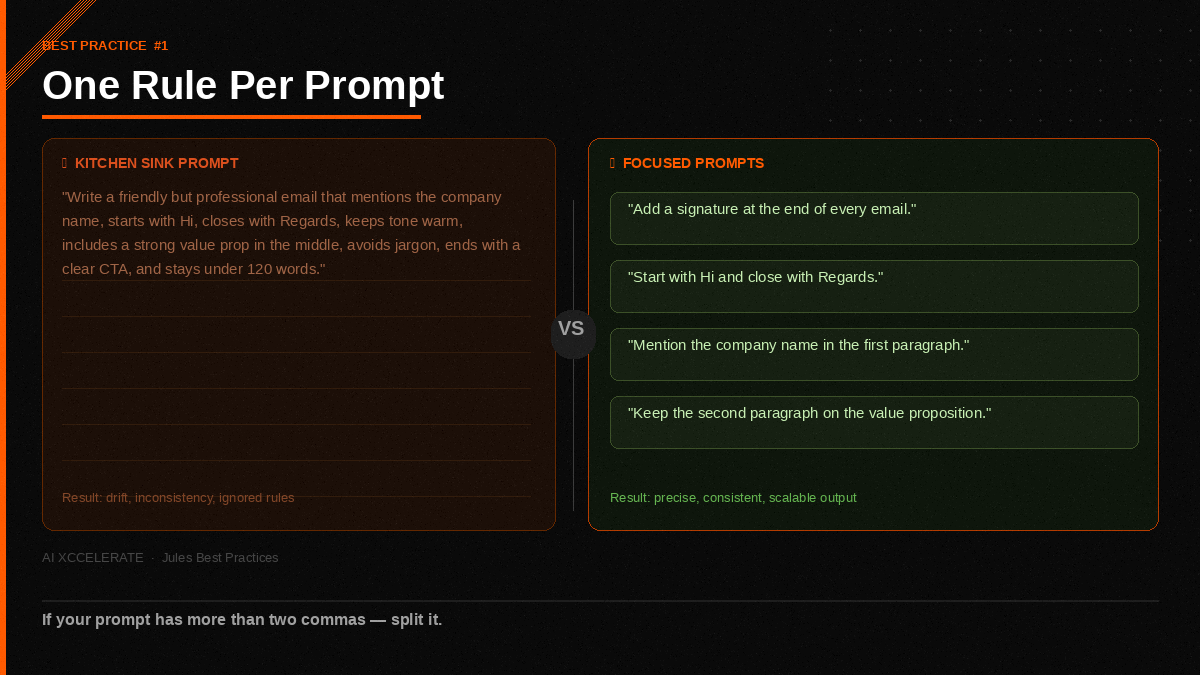
Each instruction is unambiguous. Jules applies it consistently across every message. Stack four focused prompts and you get precise control over structure, tone, and formatting — without the drift that comes from trying to pack everything into one sprawling instruction.
The rule of thumb: if your prompt has more than two commas, split it.
Are You Targeting One Persona or Several at Once?
Casting a wide net feels like it should produce more results. In outreach, it produces worse ones.
When you create a list in Jules, you get a product mode selector. The best practice is simple: pick the specific product you're targeting, then select the single persona that best fits that product. Not two personas. Not a range.
If CFOs are the right buyer for Product X, build a list of CFOs — not a combined list of CFOs, VPs of Finance, and Controllers. Here's why it matters: a single-persona list gives Jules enough consistent context to add genuinely specific, relevant detail to every message. A mixed list forces Jules to hedge, and hedged messages sound like templates. Templates get deleted.
The tradeoff feels counterintuitive — a narrower list sounds like fewer opportunities. But a focused list of 50 CFOs with sharp, specific messages will outperform a sprawling list of 200 mixed titles with generic copy every time.
How Specific Should Your Persona Description Be?
Very.
Ambiguity at the persona-definition stage flows downstream into every part of the workflow — contact fetching, message relevance, and personalization quality. If you tell Jules you want "sales leaders," it has to guess what that means. You'll see the results in contacts that don't quite match and messages that feel slightly off.
Spell out exactly who you want:
| Vague | Specific |
|---|---|
| "sales leaders" | "VP of Sales at mid-market SaaS companies in New York" |
| "finance decision-makers" | "CFO at Series B healthcare tech companies, 50–200 employees" |
| "marketing managers" | "Head of Demand Generation at B2B software companies in the US" |
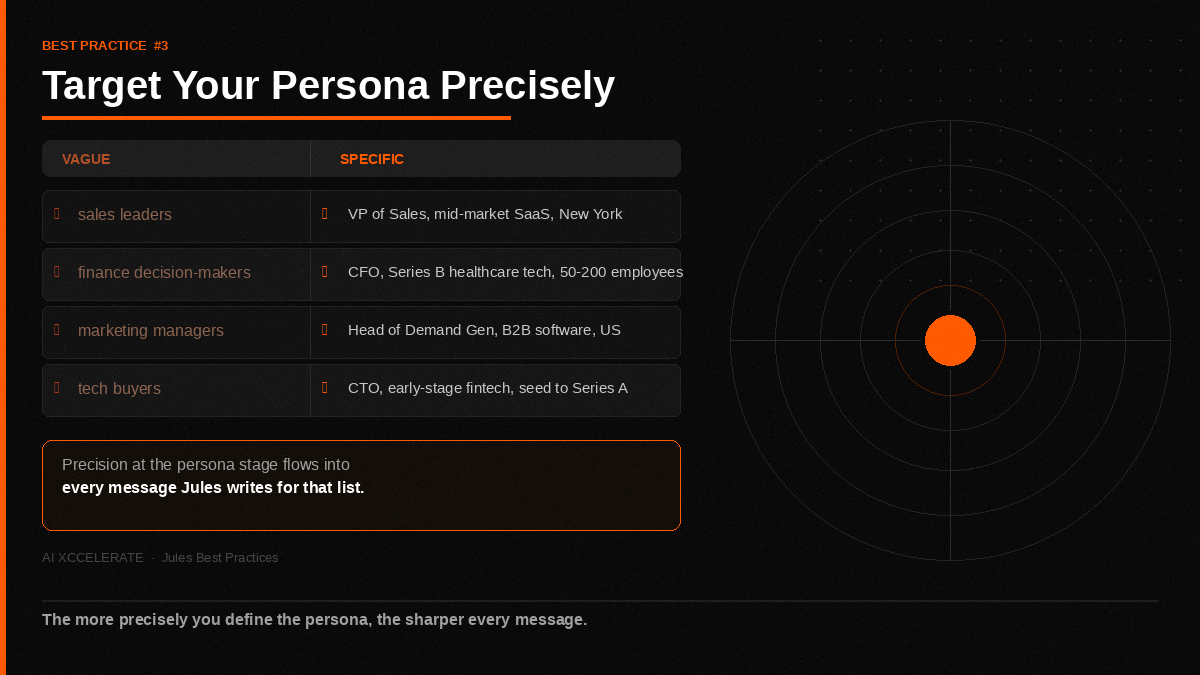
The more precisely you define the persona, the more accurately Jules fetches contacts and the sharper the messages it writes for them. Five extra minutes of specificity at this stage is worth more than any amount of message editing downstream.
How Many Filters Are Too Many?
There's a balance between specific and over-filtered — and most users only discover they've crossed the line after their list comes back half the size they expected.
Two or three well-chosen filters will reliably return a healthy list. Title, location, and industry is a strong combination for most personas. As you add a fourth filter, then a fifth, the pool of matching contacts shrinks fast. If you're aiming for 100 contacts, five filters will frequently leave you well short of that.
The practical rule:
- Start with 2–3 filters that capture your core persona
- Run the list and check the size
- Only add filters if the results come back too broad
- You can always tighten; it's much harder to recover a list that's been filtered into a corner
Specificity lives in your persona description, not in the number of filters you stack on top of it.
A Real Example: What This Looks Like End-to-End
Here's how a strong Jules workflow plays out for a founder selling a sales enablement product to mid-market SaaS companies.
The setup:
- Product: Sales enablement platform, positioned for VP-level buyers
- AIXscore data: Product category, ideal customer profile, core value props, common objections — all filled in completely
The list:
- Product mode: Sales Enablement Platform
- Persona: VP of Sales
- Filters: Industry (SaaS), Location (United States), Company size (100–500 employees)
- Total: 3 filters, 1 persona
The prompts:
- "Open every email with the recipient's first name and a one-sentence observation about their company."
- "Keep the subject line under 8 words."
- "The CTA should be a single question, not a calendar link."
The result: Draft reviewed → 78 contacts that match exactly → enriched → messages generated with consistent format and genuine personalization. No manual editing required.
The whole setup takes about 20 minutes the first time. Once your AIXscore data is solid and your prompts are saved, subsequent lists take 5.
Do You Know When Jules Spends Your Credits?
Credits are simple once you know the rule: one credit is consumed per contact, at the enrichment step — not when you create the list.
Every new list in Jules starts in draft mode. You can see this in the list status. At the draft stage, you can review your filters, check the persona targeting, and refine anything before committing. Drafting is free.
When you move the list to enrich, that's when enrichment runs and credits are deducted. One credit per contact, no exceptions.
This means you have a built-in checkpoint before any credits are spent. Use it. A two-minute review of your draft list — checking that the filters are right, the persona looks accurate, and the list size is what you expected — is the easiest way to make sure every credit goes toward contacts you actually want.
Is your outreach still running on generic templates and mixed-persona lists? That gap is costing you replies every week. Book a free 30-minute Jules Outreach Audit and we'll show you exactly how to configure Jules for your ICP — and what your reply rate looks like after the first focused campaign.
→ Book your audit
Is Your AIXscore Data Holding Your Messages Back?
Jules is only as smart as the context you give it. AIXscore is where that context lives.
For every product in AIXscore, make sure the data is complete: what the product does, who it's for, what problems it solves, and what makes it different. When that foundation is solid, everything downstream improves — persona matching, contact relevance, and the quality of every generated message.
If your messages feel slightly generic or off-target even when your prompts are right, incomplete product data in AIXscore is one of the first places to look. It's not a setup task you do once and forget — it's a living input that's worth revisiting whenever your positioning shifts or a new product launches.
Think of AIXscore the way you'd think of a new hire's onboarding brief. The more complete it is, the faster they get up to speed. The more you leave out, the more time they spend guessing.
If you want to understand why that context has such an outsized effect on output quality, it helps to see how Jules actually processes it under the hood. The architectural shift from Jules 1.0 to 2.0 — specifically the move to a multi-agent system with a dedicated Knowledge Base and four-way parallel enrichment — is exactly what makes AIXscore data so consequential. We broke that down in detail here: Jules 1.0 to 2.0: Your AI SDR Grew Up.
Putting It All Together
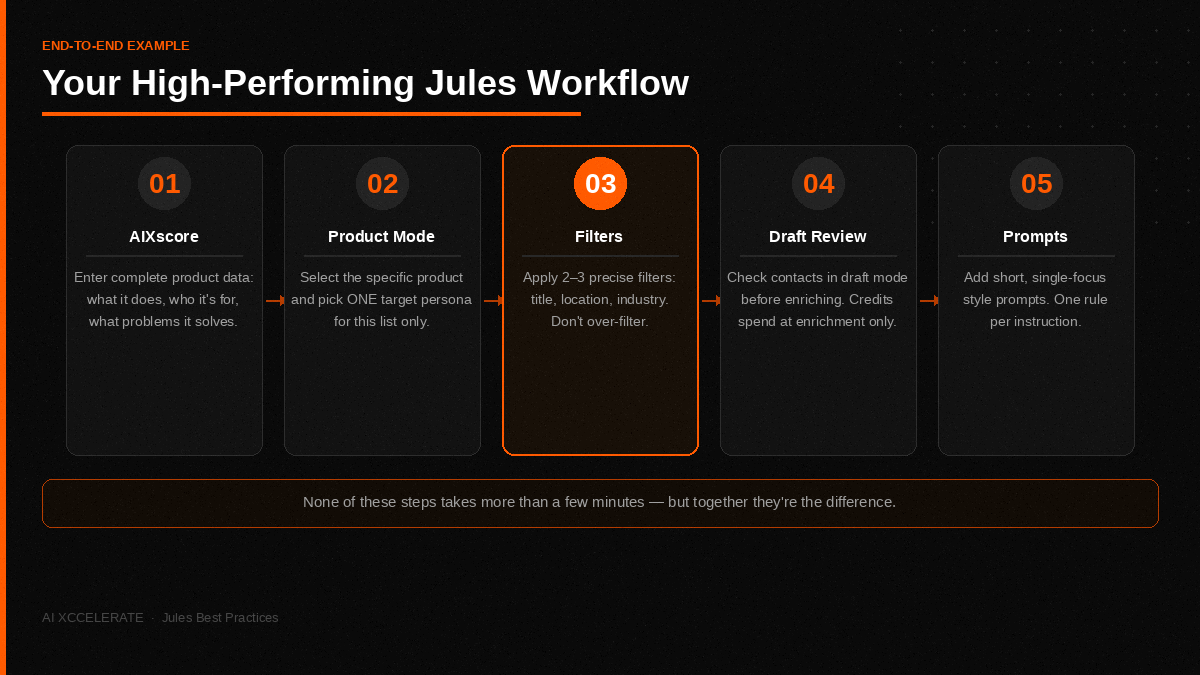
A high-performing Jules workflow has five steps, in order:
- Get your product data right in AIXscore — this is the foundation
- Build a list in product mode, targeting one specific persona — focus beats breadth
- Use 2–3 precise filters — no more than you need
- Review the list in draft mode before enriching — that's when credits are spent
- Shape your messaging with short, single-focus voice-and-style prompts — one rule per instruction
None of these steps takes more than a few minutes, but together they're the difference between outreach that sounds like a template and outreach that sounds like you wrote it for one specific person.
Frequently Asked Questions
Why are my Jules-generated messages still sounding generic even with prompts? The most common cause is either a mixed-persona list or a "kitchen sink" prompt. Messages personalize to context — if the list has multiple job titles or industries, Jules can't go deep on any one of them. Break your list into one persona, and split your prompts so each one targets a single element of the message.
How do I know if my AIXscore data is complete enough? A quick test: can someone who's never heard of your product read your AIXscore entry and immediately understand who it's for, what it does, and why someone would buy it? If the answer is no, add detail. Incomplete entries — missing ICP descriptions, vague product categories, or empty value prop fields — are the most common reason messages miss the mark.
What's the right list size to aim for? There's no universal number, but 50–150 contacts per focused list tends to be the sweet spot for most use cases. Large enough to generate meaningful outreach volume, focused enough that the personalization stays sharp. If you need more volume, build multiple single-persona lists rather than expanding the filters on one.
Can I see what a list looks like before spending credits? Yes — that's exactly what draft mode is for. Every list starts in draft. Review it, confirm the contacts look right, and only move to enrich when you're confident. Credits are deducted at enrichment, not at list creation.
How many voice-and-style prompts should I use? Most strong configurations use between 4 and 8 short, specific prompts. Fewer than 4 and you're leaving formatting and tone to chance. More than 8 and you start seeing conflicts between instructions. Start with the non-negotiables — greeting, closing, signature, one structural rule — and add from there.
Does Jules work better for email or LinkedIn outreach? Jules handles both. The best practices are the same regardless of channel: one persona per list, short focused prompts, complete AIXscore data. The main difference is message length — LinkedIn messages generally perform better shorter, so if you're targeting LinkedIn, add a prompt that caps the word count.
What happens if I enrich a list and then realize my filters were wrong? Those credits are spent — they don't roll back after enrichment runs. This is why the draft review step exists. If you do catch a filter mistake post-enrichment, the fastest fix is to build a new draft list with the corrected filters and treat the original as a learning run.
Book a free 30-minute Jules Outreach Audit. We'll review your current list-building setup, identify exactly where reply rates are leaking, and show you what a fully configured Jules workflow looks like for your pipeline volume. Typical time-to-first-result: under one week.
→ Book your free audit